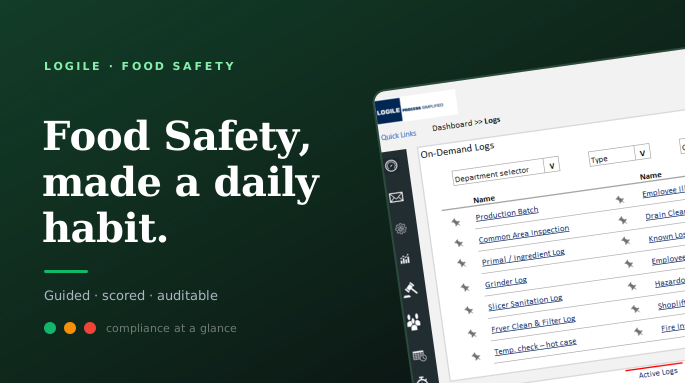
Project overview
The product
Food Safety serves the people who keep a grocery store compliant: store managers, department managers in deli, bakery, meat, produce and grocery, the associates who do the work, and the food-safety and compliance leaders who answer for it. It replaces brittle paper logs and disconnected checklists with one system that schedules the work, captures the entry, scores the result, and surfaces risk in real time.
The mandate
Package a complete, configurable food-safety program that drops into the Logile modules a retailer already owns or stands on its own: logs, supporting tasks, training and reference, communications, and dashboards. The defining constraint: compliance work is dense and regulated, but it has to be fast enough to do between tasks, on the sales floor, by a high-turnover team.
Make food-safety compliance something a store team can actually keep up with, the system guides the work, captures proof, and turns it into a score a manager can act on, instead of a binder no one reads until an inspector arrives.
My role
As the UX designer on the Food Safety program, I owned the application design, the information architecture across modules, the screen-level workflows, the data-dense dashboards, and the responsive behavior from desktop down to a phone in an apron pocket.
This wasn't a greenfield product. It had to live inside Logile's existing platform and design language, reusing the modules retailers already ran, so the work was as much about fitting in cleanly and configuring for many clients as it was about designing new screens. I partnered closely with the food-safety subject-matter expert who defined the program, and with product and engineering to phase delivery.
1 in 6 Americans gets sick a year. A lapse means fines and liability.
Food safety work manages serious risk. The CDC estimates that roughly 1 in 6 Americans gets sick from foodborne illness each year. For retailers, a lapse can mean fines, litigation, lost sales, and personal liability for leadership under the Park Doctrine. Paper checklists could not give teams real-time visibility or reliable proof of compliance.
Paper logs, no visibility
Temperature checks, sanitation, production batches, all captured on clipboards that were easy to skip, easy to lose, and impossible to roll up. Leadership couldn't see compliance until something went wrong.
Compliance & liability exposure
Federal, state, and local rules differ by site, and a missed log isn't a paperwork problem. It's fines, failed inspections, recalls, and personal liability for leadership.
Fragmented across departments
Deli, bakery, meat, and produce each ran their own routines with no shared view and no real-time alerts. A problem in one department stayed invisible until an audit surfaced it.
Training & turnover burden
High-turnover floor staff had to memorize procedures and rules. Without guidance built into the work, execution was inconsistent and onboarding was slow and expensive.
Built for many retailers, so discovery leaned on domain and regulation
This was a productized program built for many retailers, not a single client, so discovery leaned on domain expertise and regulation rather than one store's workflow. I worked from the food-safety SME's program definition, the rules every site has to meet, and the operational reality of how store departments actually run.
Domain expertise
A food-safety subject-matter expert defined the program, every log, routine, and the score behind it. I translated that into screens and flows.
Regulatory mapping
Federal, state, and local requirements vary by site, so the program had to be configurable, not hard-coded. That shaped the IA from the start.
Operational reality
How departments run their day, who does what and when, and how this had to slot into Logile's existing labor, task, and scheduling modules.
Four quadrants of focus
Research constraint: this packaged solution relied on domain experts and regulatory requirements rather than fieldwork in one store. I designed it so each retailer could configure departments, sites, and local rules.
What shaped the design
Compliance only works if it fits the floor
If logging is slower than the work itself, it doesn't happen. Entries had to be quick, glanceable, and doable on a phone between tasks, not a desk activity at the end of a shift.
Managers need risk at a glance, not raw logs
A pile of completed logs tells a manager nothing fast. A score, a grade, and a red/yellow/green map of departments tells them exactly where to spend the next ten minutes.
Guidance beats memory
With high turnover, the system, not the employee, should carry the procedure. Directive tasks and reference docs tied to each log mean the right way is the obvious way.
One program, many departments and roles
An associate, a department manager, and a chain leader need different views of the same program. The system had to flex by role and department without fragmenting into separate tools.
IA first, then phased so the foundation could ship early
Because the program had to integrate with existing modules and ship to real retailers, I structured the IA first, then designed in phases so the foundation could go live while later capability was still being built.
Structure first
Before screens, I mapped the program onto a clear set of areas, Logs, Tasks, Communications, Reference, and Dashboards, each tied to a stage of the daily routine and to the role that owns it. That structure is what let one program serve an associate, a department manager, and a chain leader from the same system.
Designing inside an existing system
Everything reused Logile's established UI language and slotted into modules retailers already ran: labor model, tasks, scheduling. The discipline here was consistency and configurability: new capability that felt native to the platform and could be tuned to each client's departments, sites, and local rules.
The decision that shaped everything: don't just digitize the logs, score them. Every completed routine rolls up into a task score, a department grade, and a store ranking. That turned a stack of paperwork into a single signal a manager could act on, and gave leadership real-time visibility they never had on paper.
One program, five connected areas, one daily grade
One program, five connected areas. The work gets scheduled and logged, the system monitors and scores it, training sits one tap from the task that needs it, communications keep the store aligned, and dashboards turn all of it into a grade leadership can act on, whether at a desktop or on the floor.
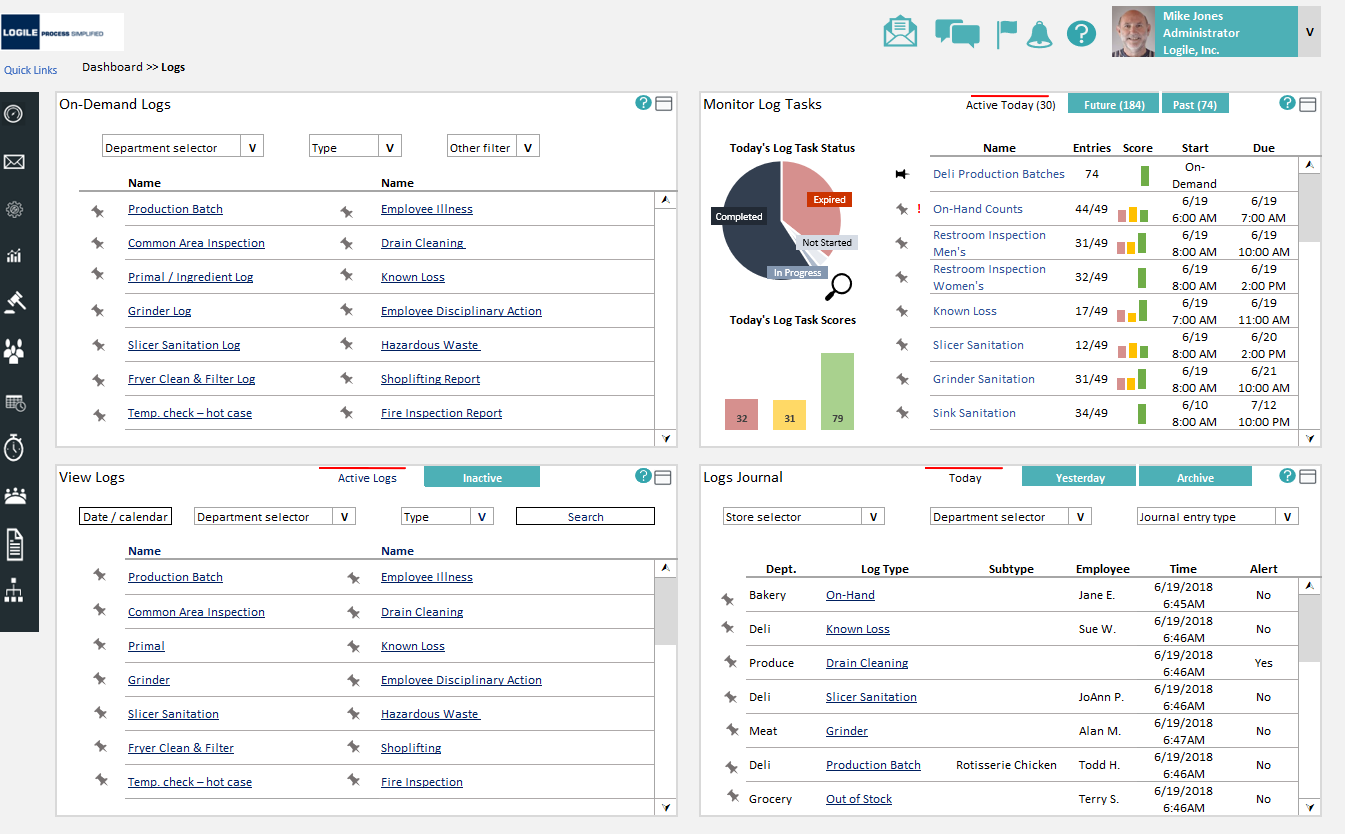
Every log in one workspace
The Logs workspace puts the whole loop on one screen: on-demand logs to start, monitored log tasks with live status and scores, a view of active logs, and a running journal of everything captured. A manager can see what's due, what's expired, and today's scores without opening four different places.
Why it matters: the paper binder becomes a live picture of the day, with risk visible the moment a task slips.
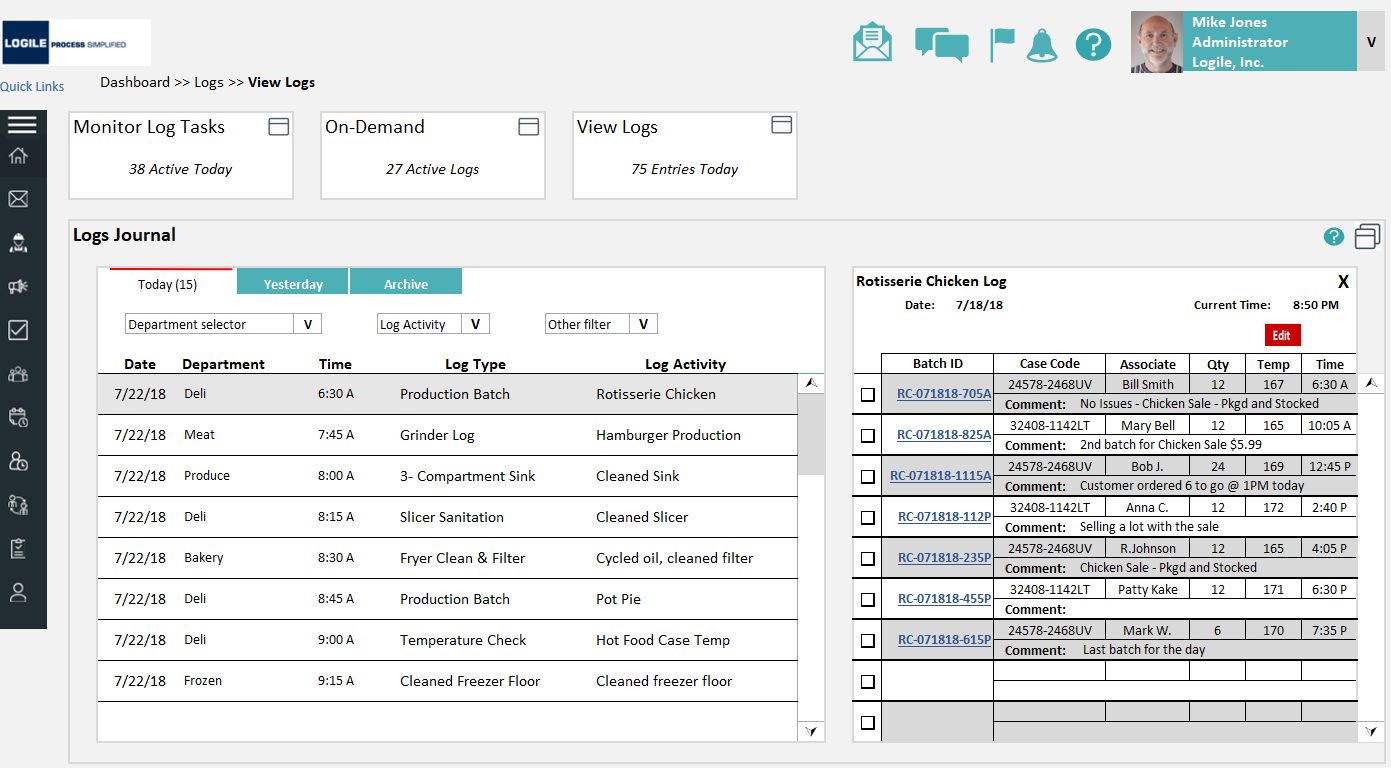
A journal that proves the work
Drilling into the journal shows every logged event, department, log type, who did it, when, and any alert, with the detailed batch record beside it: case codes, temperatures, quantities, associate, and comments. This is the audit trail an inspector or a recall investigation needs, generated as a by-product of doing the work.
Why it matters: compliance becomes provable, not just claimed: every entry is traceable and time-stamped.
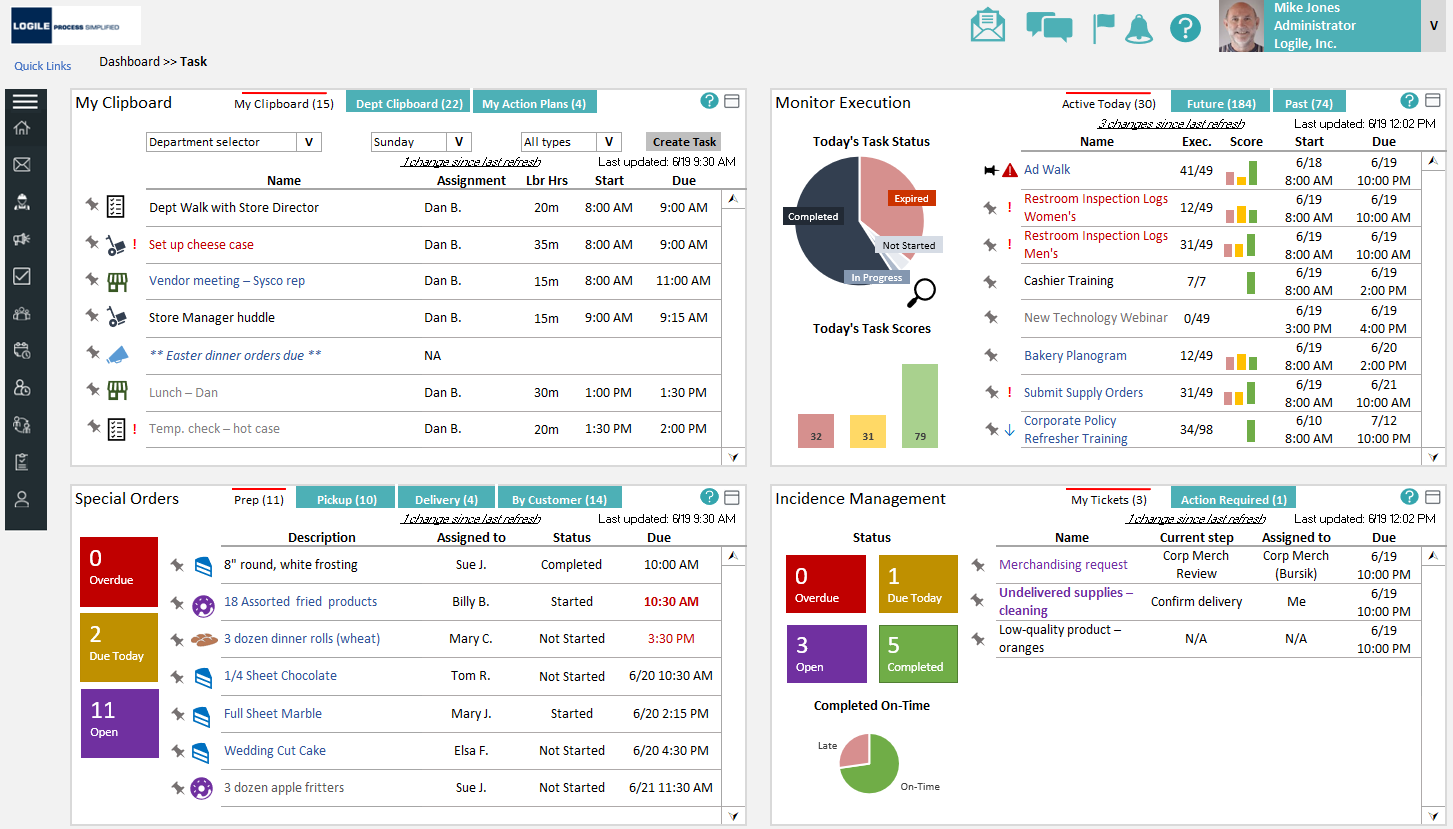
The work, monitored and scored
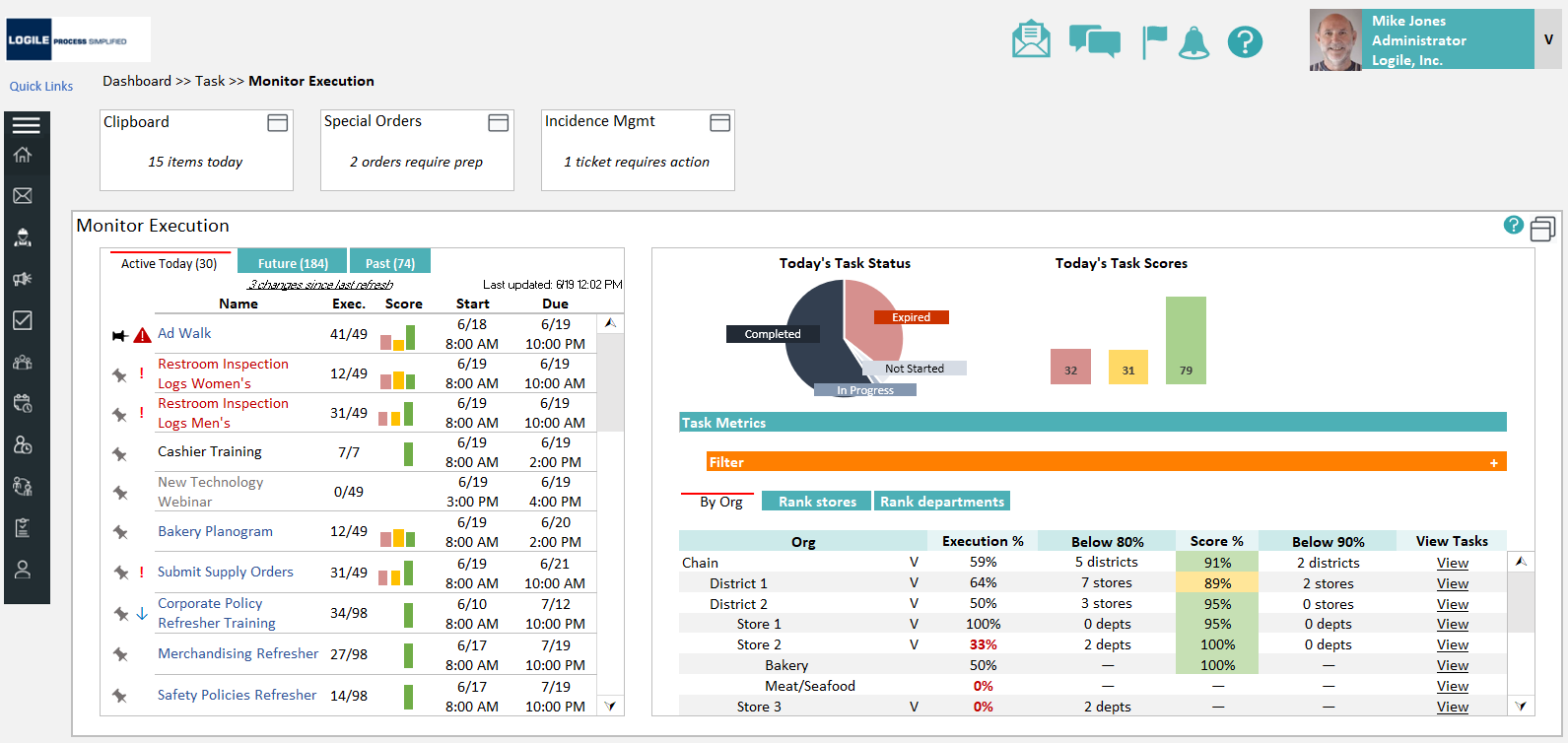
Food-safety routines run as tasks alongside the rest of the store's labor. The Tasks workspace pairs a manager's clipboard with monitored execution, special orders, and incidence management, each with its own status and score, so the day's food-safety work lives next to everything else a department owns instead of in a separate silo.
Why it matters: food safety stops being extra work and becomes part of the normal task flow.
Performance you can rank
Monitor Execution turns task completion into objective metrics, today's status, today's scores, and execution percentage broken down by org, store, and department. A leader can rank stores, spot the ones below threshold, and drill straight into the tasks behind a low score.
Why it matters: the program becomes measurable and comparable, accountability that survives across hundreds of stores.
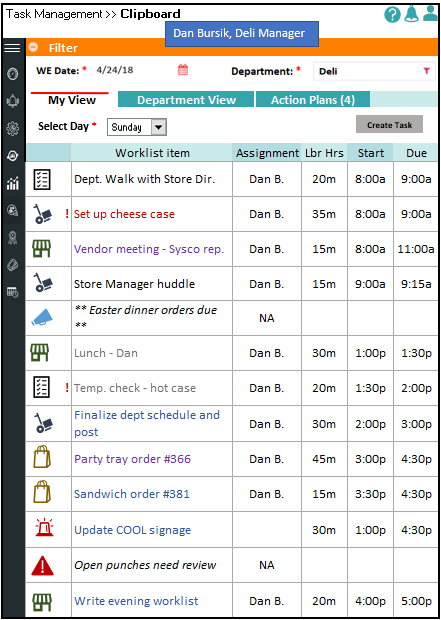
A clipboard that fits a phone
The same program collapses to a focused mobile clipboard: the day's worklist for a department, what's assigned, when it's due, with the urgent items flagged. This is where most food-safety work actually gets done, between tasks, on the floor, not at a desk.
Why it matters: if it isn't doable on a phone in seconds, the log doesn't get made.
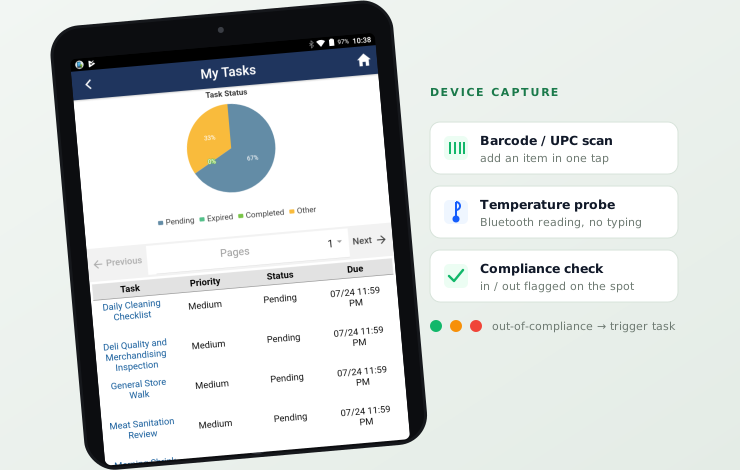
Scan, probe, and tap instead of typing
The program runs on any mobile device, native, hybrid, or browser, and leans on the hardware a store already has: barcode/UPC readers to pull an item in a tap, and Bluetooth temperature probes to record a reading without a keyboard. For each task, the system prompts for the right input, scan this, probe that, confirm, so the associate follows the task instead of remembering it.
Every entry is checked against the rule as it's made: the program flags whether the reading is in or out of compliance on the spot, and an out-of-compliance result can automatically spawn a trigger task, the corrective action, so a failed check never just sits in a log. On a tablet at the case or a phone in a cooler, the interaction is the same: a few taps, validated, logged, scored.
Why it matters: scanning and probes make logging faster and more accurate than paper, and instant compliance feedback turns a record into a prompt to act.
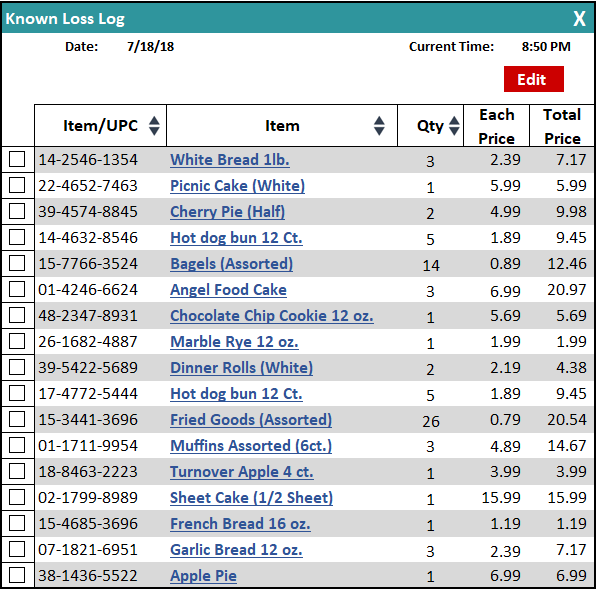
Where a paper log meant writing out items and prices by hand, the digital log is keyed by UPC: scan the barcode and the item, quantity, and price fill themselves in. Faster than paper, and no transcription errors to chase down later.
Keeping the store aligned
Food-safety culture is part of the program, not an afterthought. Communications brings news, store talk, mail, and a live report card together, so performance, alerts, and recognition reach associates where they already work, including print-ready exhibits for the breakroom board.
Why it matters: visible scores and shared updates make food safety a habit the whole store owns.
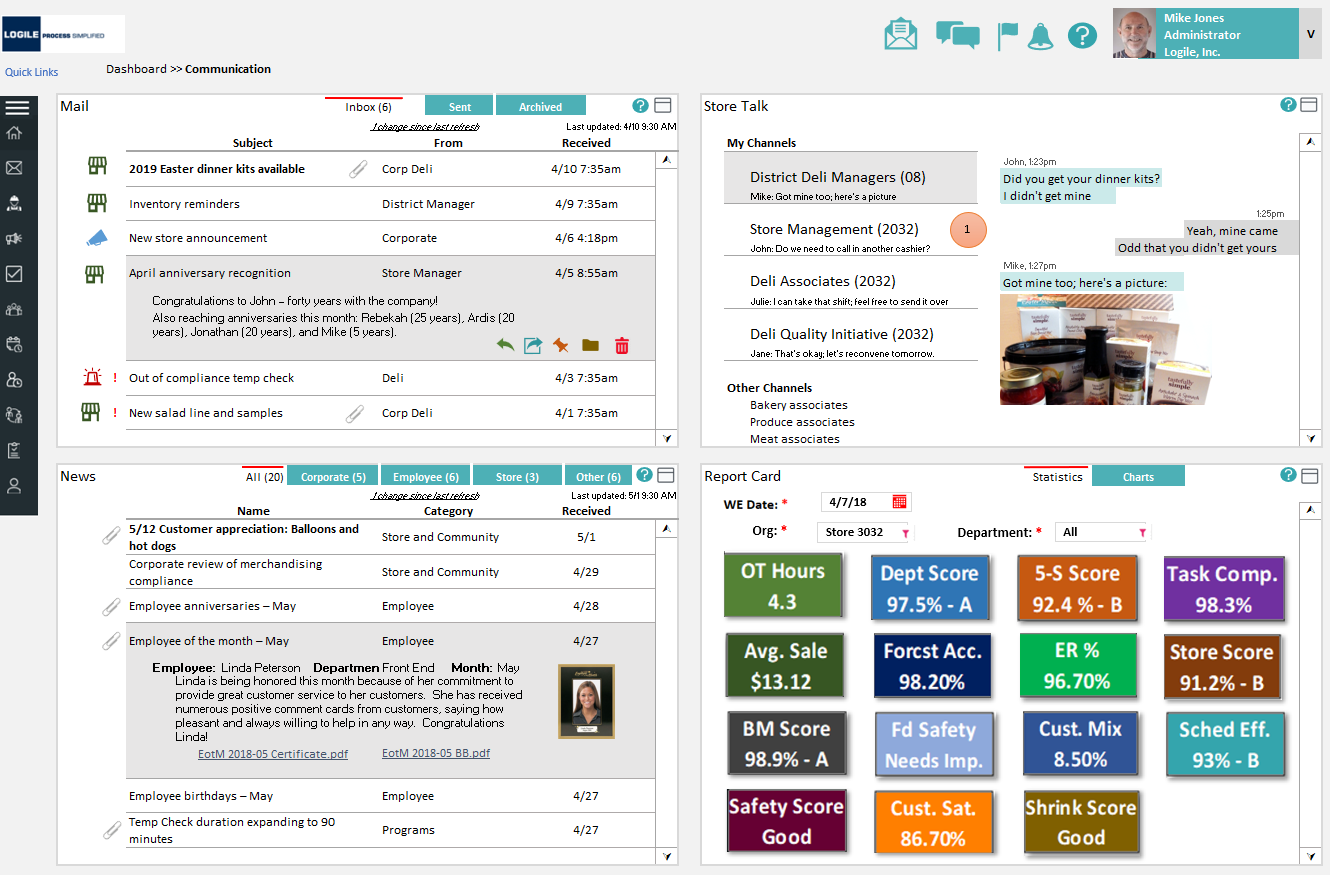
A grade everyone understands
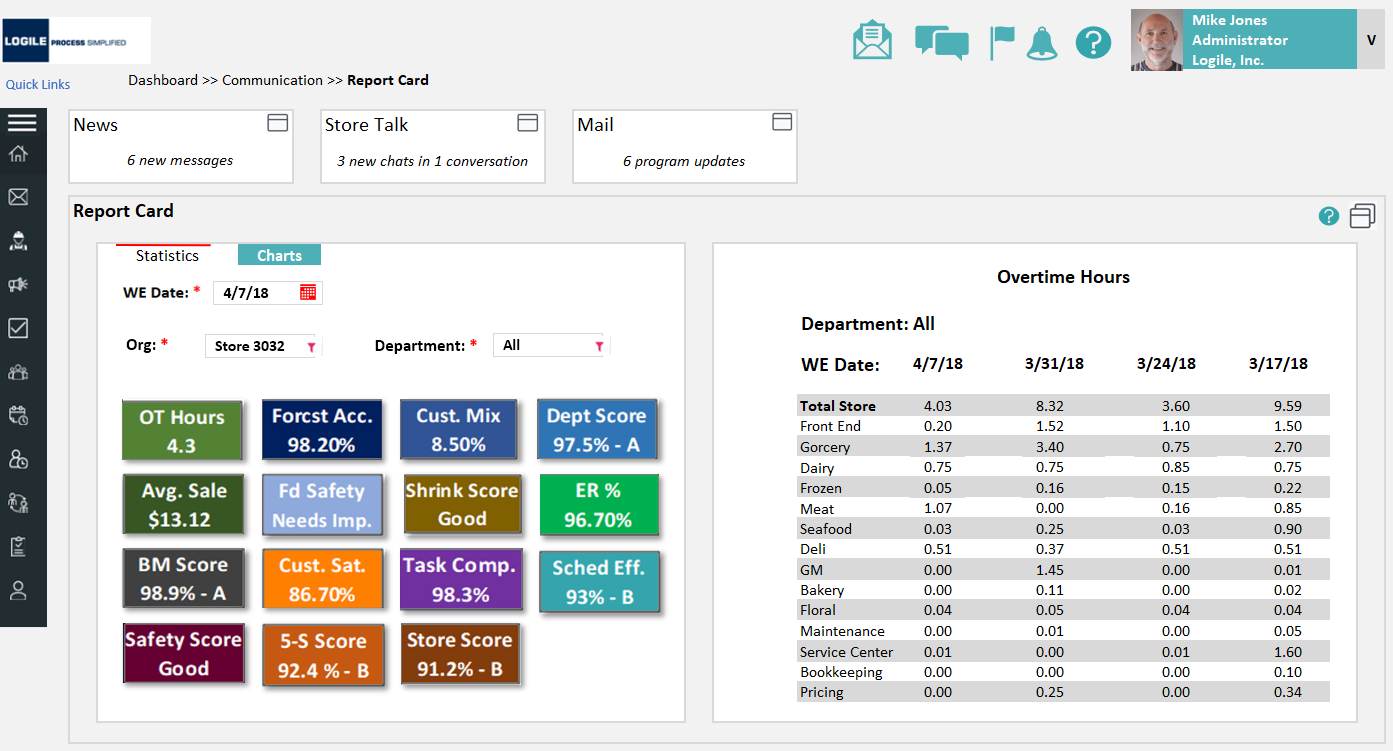
The report card distills the whole program into scores and letter grades, food-safety score, store score, department scores, alongside the operational metrics a store already tracks. Color does the talking: green is good, yellow needs improvement, red needs action. A manager reads the store's standing at a glance.
Why it matters: a single, familiar grade makes a dense compliance program legible to everyone from associate to chain leadership.
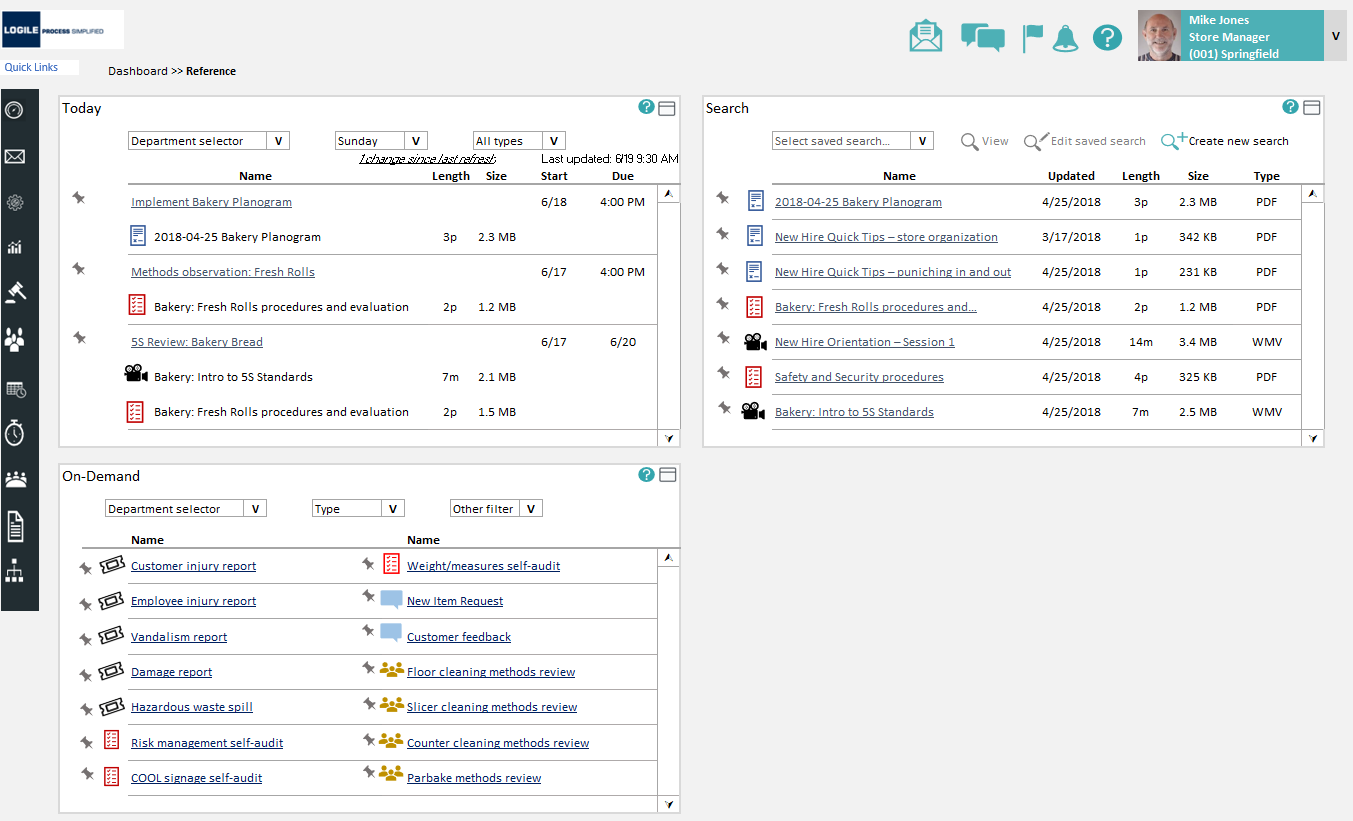
Guidance one tap from the task
Every routine carries its instructions: method sheets, visual aids, implementation guides, and training videos, surfaced right from the task list and the Reference area. Today's required reading sits next to on-demand procedures, so a new hire learns the right way at the moment they need it.
Why it matters: the system carries the procedure, so turnover stops eroding execution.
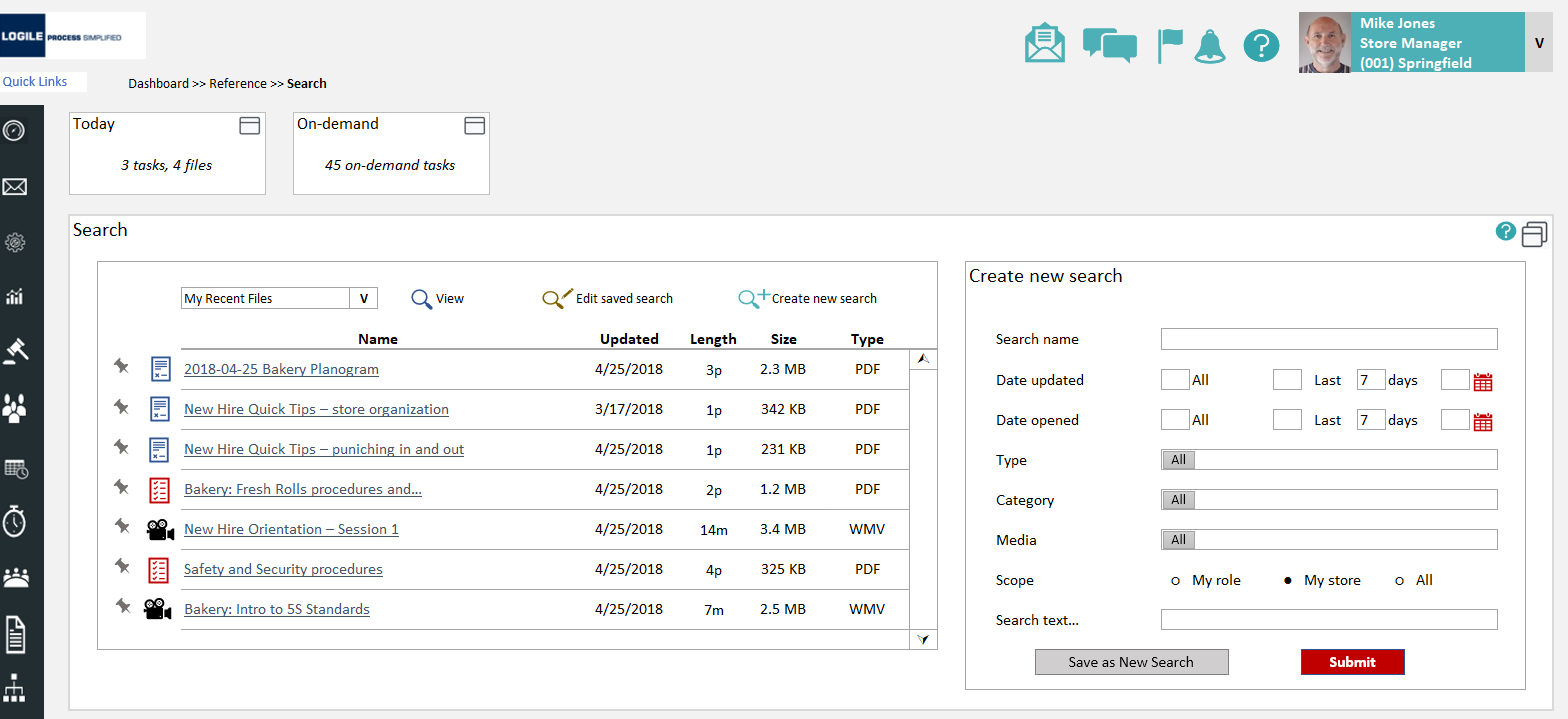
Find the right document fast
A focused search lets staff filter the document library by type, category, media, and scope, my role, my store, or all, and save searches they run often. Procedures, planograms, and training videos are a few keystrokes away instead of buried in a shared drive.
Why it matters: reference only helps if people can find it, so search and scope were first-class, not an afterthought.
The program rolled up to a KPI view
The Food Safety program reports into the same Home dashboard and KPI view a store already uses, so its score sits beside sales, labor, and the other measures leadership tracks. A mini-container reports the current grade; drilling in opens the full performance detail.
Why it matters: food safety earns a seat at the table it's measured next to the metrics the business already lives by.
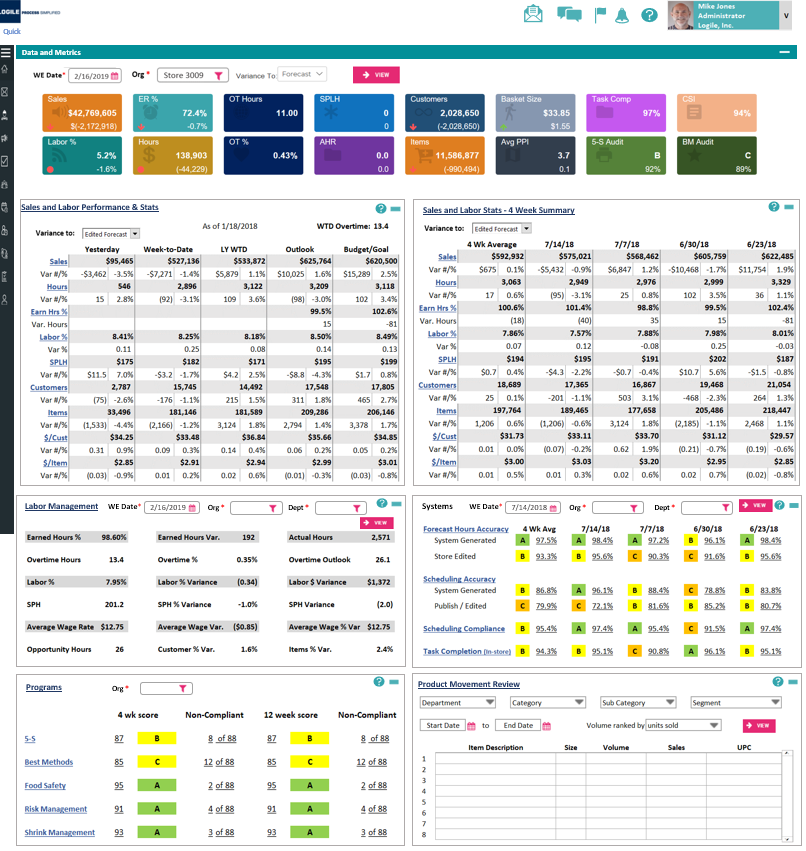
Dense data, still scannable
The detailed metrics views pack a lot: status tiles up top, then variance tables across yesterday, week-to-date, and year-to-date. The design challenge was making that density readable: consistent tiles, semantic color for variance, and a clear hierarchy so the eye lands on what's off before what's fine.
Why it matters: enterprise screens are unavoidably dense, the value is in making them legible at a glance.
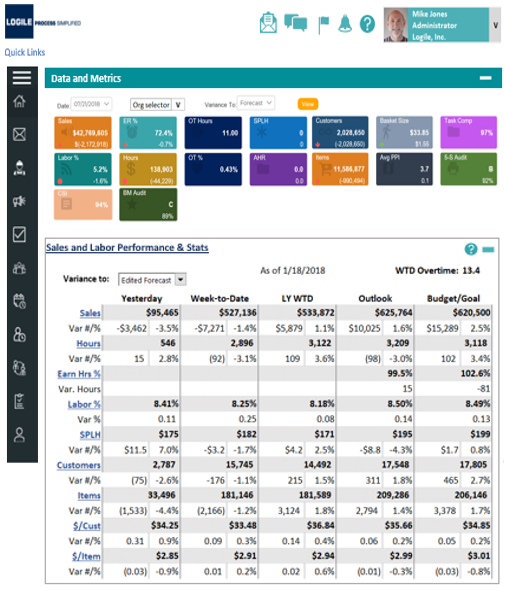
Designing within an existing system
Food Safety wasn't a place to invent a new look. It had to feel like a native part of Logile's platform. The craft was in restraint: reuse the established components and patterns, keep dense screens scannable, and lean on one consistent status language so a manager reads state the same way everywhere.
Status color does the talking
Red / yellow / green carries compliance state consistently, on a score, a department, a task, or a map, so urgency is legible before anyone reads a number.
Scores, grades, and rankings
A consistent scoring vocabulary, built from numeric score, letter grade, and rank, repeats across logs, tasks, report cards, and dashboards so the same idea always looks and reads the same.
Container-based layouts
Each area is a grid of self-contained containers that can maximize for focus or sit together on a landing page, the pattern that let one workspace hold four jobs without feeling cramped.
Responsive by design
The same program scales from a dense desktop dashboard to a focused mobile clipboard, so the people on the floor and the people in the office work from one system, not two.
The new features needed to feel native to Logile's existing platform. They use familiar patterns, behave predictably, and adapt to each retailer's departments, sites, and local rules without a redesign.
From paper no one could see to a guided, scored, auditable system
Food Safety shipped as a packaged Logile solution, a complete program retailers can deploy and configure to their own sites and local rules. The shift it delivered is structural: from paper no one could see, to a guided, scored, auditable system embedded in the tools stores already run.
* Outcomes described qualitatively, this was a packaged offering configured per retailer rather than a single measured deployment.
The real result is a change in how a store relates to food safety: instead of a binder checked once a quarter, compliance becomes a daily, visible score everyone from associate to chain leadership can see and act on, and a strong program protects the brand, the customers who eat the food, and the people who could otherwise be held liable.
What this project taught me
Scoring is a design decision
Turning logs into scores, grades, and rankings mattered more than any single screen. It made a dense compliance program easier to read and act on.
Constraints from a platform are a gift
Designing inside Logile's system meant reusing patterns rather than inventing, which sped delivery and made the program feel native. Restraint was the right move, not a compromise.
Design for the floor, not the demo
A beautiful desktop dashboard means little if the associate can't log a temperature in ten seconds on a phone. Mobile and speed had to be first-class, not a port.
Configurability is a UX problem
Serving many retailers with different rules meant the IA itself had to flex. Designing the right seams for configuration mattered as much as any individual flow.
What I'd do differently
Get into a store. The program was strong on domain expertise; watching real associates run these routines would have sharpened the mobile flows and the entry interactions earlier.
Define success metrics up front. As a packaged offering it shipped without per-store targets; agreeing measurable outcomes early would have made impact easier to prove post-launch.
Pressure-test the mobile entry deeper. The clipboard worked, but the fastest possible logging interaction, gloves on, in a cooler, deserved its own focused exploration.
Predicting a lapse before the score slips
Predictive risk, not just reporting
The program already captures structured data on every routine. The natural next step is using it to predict where a lapse is likely before it happens, nudging the right department before a score slips, rather than reporting after.
Deeper mobile-first capture
As more of the work moves to the floor, the entry experience itself, from scanning a probe to snapping a photo to confirming in one tap, is where the next gains in adoption and accuracy live.
Food Safety was a study in making something genuinely high-stakes feel routine. The win wasn't a flashy interface. It was taking a dense, regulated, easy-to-skip program and turning it into a guided, scored, daily habit that a whole store can see, embedded so cleanly into existing tools that it feels like it was always part of them.